ACORD 125 · 126 · 130 · 140
Enter the prospect once. Get the ACORD 125 pre-filled.
Add the business name, website and a few details. RTU pre-fills the ACORD 125, 126, 130 and 140 for you to review and download, and flags missing info and red flags before you submit.
Not a blank PDF: RTU fills the form from your prospect’s details.
- 25 free AnalysisOne prospect added to RTU: typed in, or read from a document or a website. Re-checking a prospect you already added doesn’t use another. a month
- No credit card
- Unlimited users
What you bring, what RTU gives back
You bring
- An ACORD application, a broker submission or the business’s website, or just type the details in
- Once, for Carrier fitHow a prospect lines up against the appetite rules on your own carriers, with the reason for each miss. It isn’t RTU’s view of the market, and it isn’t a carrier’s decision.: the carriers you work with and what each of them writes
RTU gives back
- A readiness score with every gap listed and ranked
- Carrier fit against your carriers and the Appetite rulesThe rules on each of your carriers about what it writes: industries, coverage lines, size, geography and red flags. You can review and change them at any time; RTU applies them. on them, with the reason for each miss
- Pre-filled ACORD formsStandard industry application forms. RTU pre-fills them from the risk file for you to review and download; your agency holds its own ACORD licence. and a submission package
You stay in control
- You review the appetite rules on your carriers and every field, and decide what to fix
- You certify the forms and submit them yourself
- Carriers underwrite
- 1Enter the business name and website
- 2Review what RTU filled and what’s missing
- 3Download the pre-filled ACORD 125 and the forms that apply
Is RTU a fillable ACORD PDF?
No. RTU is pre-submission intelligence for commercial agencies. It builds a Risk fileEverything on file for one prospect: business details, locations, coverages, loss history and documents. for the prospect, scores quote readiness, flags missing information and red flags, and checks fit against the appetite rules on your agency’s carriers. The ACORD applications are generated from that same risk file at the end.
Readiness first, forms second
The form is the last step, not the first
Retyping a 125 is slow. Retyping one for a file that wasn’t ready is worse. RTU puts the readiness check in front of the paperwork.
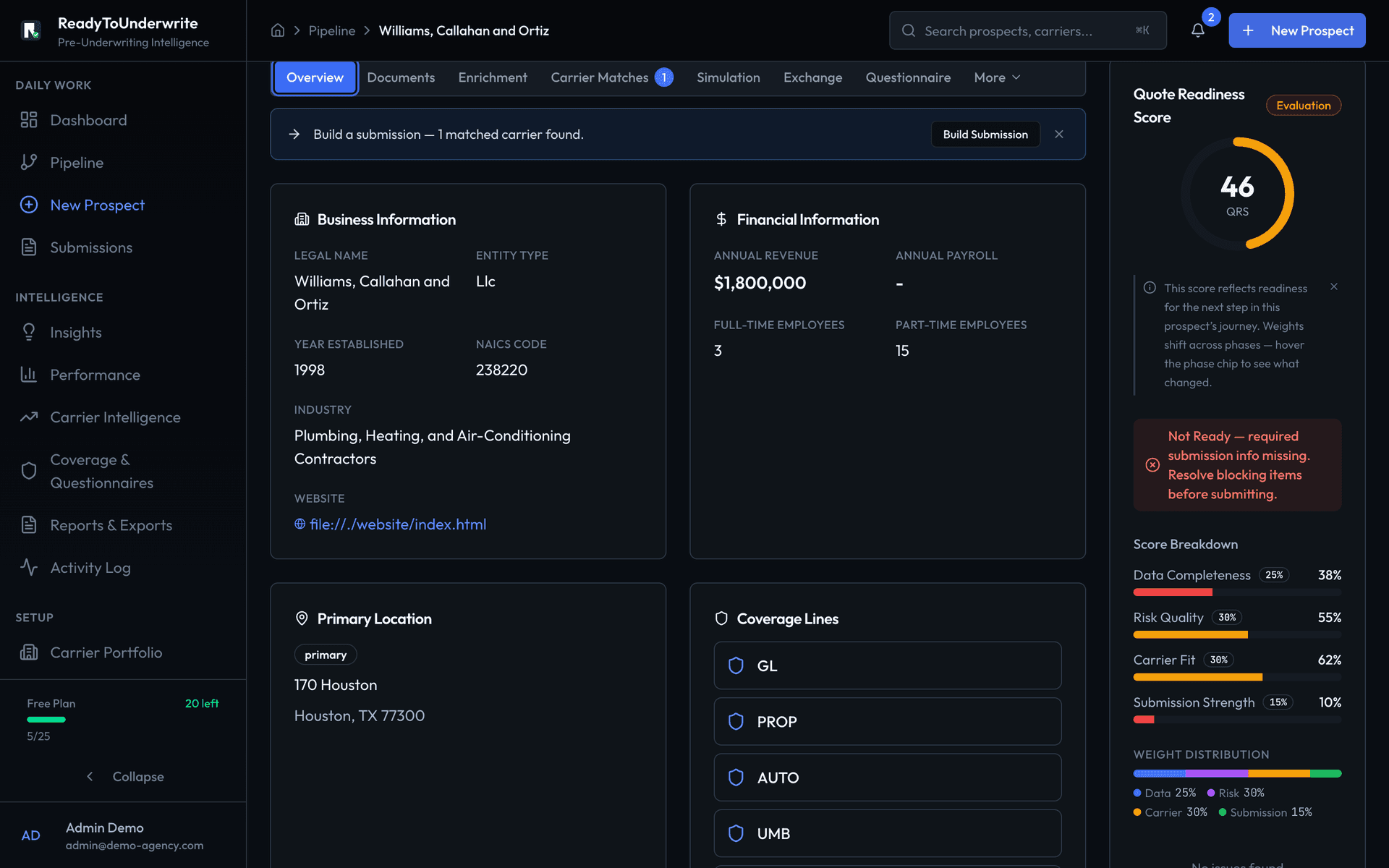
1 · Before the forms
See where the file stands
A Quote Readiness Score (QRS)A 0–100 score of how complete and submission-ready a prospect’s information is. It is rules-based. It isn’t a prediction of whether a carrier will quote. and the specific items standing between you and a submittable file, weighted so you can see what moves the number.
It’s RTU’s own reading of the file: advice, not a gate. Whether a gap is worth closing is your call.
2 · Then the forms
Every applicable ACORD form, pre-filled
The applications shown above are generated from the risk file you already reviewed, ready to download. Open gaps stay listed beside them, so nothing is quietly left out.
You submit them the way you do today: email, carrier portal or AMS import.
The forms
What RTU fills on each application
The 125 carries the applicant: legal name, entity type, NAICS, years in business, premises and your insured’s interest in them, prior carriers, additional interests, and the general-information questions.
RTU fills it from the risk file you built for the readiness check, so the data you reviewed is the data on the form. Start from a document you already have and RTU extracts those fields for you, each with a confidence level you can correct.
When general liability is on the file, the 126 is generated alongside the 125 from the same risk file. Anything missing shows up in the readiness checklist first, marked critical, warning or suggestion, so you see it before the form does.
Class codes by state, payroll and employee counts flow from the file into the 130, including other states with future or incidental exposure. The 130 rating worksheet holds one state, so for a multi-state risk RTU says so and leaves the other states’ worksheets for you to complete, rather than guessing.
Building and business personal property values and fire-protection details for each location fill the 140. The same values feed the property side of the readiness score, so a thin property schedule is visible before you build the file.
All 18 forms · all 50 states
Only the forms that apply to the coverages on the file are generated. On the schedules (139, 129, 163), RTU pre-fills the header and you complete the rows.
- ACORD 125 · Commercial Insurance Application
- ACORD 825 · Professional/Specialty Application
- ACORD 130 · Workers Compensation Application
- ACORD 126 · Commercial General Liability Section
- ACORD 140 · Property Section
- ACORD 160 · Businessowners (BOP) Section
- ACORD 131 · Umbrella / Excess Section
- ACORD 152 · Commercial Inland Marine Section
- ACORD 147 · Installation / Builders Risk Section
- ACORD 127 · Business Auto Section
- ACORD 137 · Commercial Automobile
- ACORD 807 · Directors & Officers Section
- ACORD 827 · Employment Practices Liability Section
- ACORD 832 · Miscellaneous E&O Section
- ACORD 834 · Cyber & Privacy Section
- ACORD 139 · Statement of Values
- ACORD 129 · Vehicle Schedule
- ACORD 163 · Commercial Auto Driver Schedule
What RTU does and doesn’t do
RTU pre-fills ACORD forms for the initial quote phase for you to review and download. Your agency holds its own ACORD licence and certifies each form, and you submit it yourself.
RTU never transmits anything to a carrier, and it doesn’t manage post-bind documents, renewals or amendments. Your prospect data belongs to your agency; see our security and privacy pages.
Questions
ACORD forms in RTU
Which ACORD forms does RTU fill?
RTU generates 18 ACORD application, section and schedule forms for the initial quote phase, including ACORD 125, 126, 130 and 140, in all 50 states. Only the forms that apply to the coverages on the file are generated.
Does RTU send the forms to carriers?
No. You download the pre-filled forms and submit them the way you do today: email, carrier portal, or an AMS import. RTU never transmits anything to a carrier on your behalf.
Do I need my own ACORD licence?
Yes. ACORD forms are the property of ACORD Corporation. Your agency confirms it holds its own ACORD licence when generating forms, then reviews and certifies each form before using it.
What does the free plan include?
25 analyses a month with every feature, including ACORD form generation, for unlimited users. No credit card is required.
Run your next ACORD 125 through RTU
Start from a document you already have, see where the file stands, then download the forms.
- 25 free analyses a month
- No credit card
- Unlimited users
ACORD is a registered trademark of ACORD Corporation. ReadyToUnderwrite is not affiliated with or endorsed by ACORD.